

You are using an out of date browser. It may not display this or other websites correctly.
You should upgrade or use an alternative browser.
You should upgrade or use an alternative browser.
Consolidated site upgrade issues list
- Thread starter C-ya
- Start date
- Status
- Not open for further replies.


coolasice
Member
I know the mobile site is in the works, but something changed and I can no longer connect with my windows mobile phone (windows mobile 6.1). I am using Opera Mini 5.1 and it does not matter If I have the "Mobile View" setting on or off. I get the following error:
"Fatal error: Call to a member function mobileLlink() on a non-object in /home/gmtn/public_html/forums/hooks/membermapMobileLink_e5fbfe0a2b4fb4258a52bb04c04c8f75.php on line 21"
"Fatal error: Call to a member function mobileLlink() on a non-object in /home/gmtn/public_html/forums/hooks/membermapMobileLink_e5fbfe0a2b4fb4258a52bb04c04c8f75.php on line 21"
Upvote
0

Redoing them worked for me as well. The signature imported just fine from the old forum, then the color and bold stopped. OK now after a WYSIWYG re-do.MAY03LT said:About the sigs - my blue/bold team cake sig changed to a text color/bold code like Bill's is now. I redid it and it works like normal.
Upvote
0

Robbabob
Member
- Joined
- Dec 10, 2012
- Posts
- 1,096
Scrolling to the bottom of any page, get in the middle and click Forum Support System. Here or there!coolasice said:I know the mobile site is in the works, but something changed and I can no longer connect with my windows mobile phone (windows mobile 6.1). I am using Opera Mini 5.1 and it does not matter If I have the "Mobile View" setting on or off. I get the following error:
"Fatal error: Call to a member function mobileLlink() on a non-object in /home/gmtn/public_html/forums/hooks/membermapMobileLink_e5fbfe0a2b4fb4258a52bb04c04c8f75.php on line 21"
Edit: Reworded.
Upvote
0

I'm not sure why this occurred, but it was related to the new member map and should be resolved now.coolasice said:I know the mobile site is in the works, but something changed and I can no longer connect with my windows mobile phone (windows mobile 6.1). I am using Opera Mini 5.1 and it does not matter If I have the "Mobile View" setting on or off. I get the following error:
"Fatal error: Call to a member function mobileLlink() on a non-object in /home/gmtn/public_html/forums/hooks/membermapMobileLink_e5fbfe0a2b4fb4258a52bb04c04c8f75.php on line 21"
Upvote
0
hayes said:I don't know if it's a bug, or I simply can't find it, but where is the subscribed topics button? The one that allows me to see everything that I have already subscribed to...
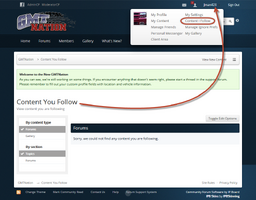

Upvote
0

Upvote
0
If you have posted a problem in this thread that has not been addressed, please submit a ticket using our support system. The link to the support system can be found at the bottom of every page, or by clicking here.
Most of the links have been fixed, the remaining links have been notated.Robbabob said:I suggest putting a note on the FAQ video page that the site is under repair while the update is taking place.
Upvote
0

I'm not sure that anyone else is having this issue as I haven't been able to find anything on it here...
I used to be able to view the forum via Tapatalk, but I've started getting the following screen when I try and open the forum up:
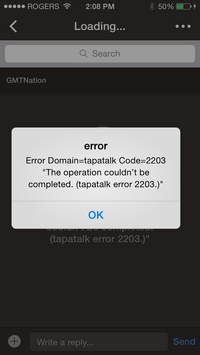
I'm thinking that this is an issue with the app itself... can anyone confirm that however??
I used to be able to view the forum via Tapatalk, but I've started getting the following screen when I try and open the forum up:
I'm thinking that this is an issue with the app itself... can anyone confirm that however??
Upvote
0



I've noticed this problem since the upgrade... I think it has to do with Tapatalk. I need to gather more information from the staff members that this happens to. I suspect Tapatalk still has an active session on their mobile device at the same time that they may be active on a web browser. I haven't put much time into figuring it out yet.
Upvote
0
Upvote
0


I have noticed an issue the last few weeks where certain threads and pages of certain threads will not load. I do not get any errors. The screen loads and stays completely blank. The same issue happens whether I am using IE (any version) or Chrome. However, I can see the thread via TapaTalk on Android.
It has happened a couple times on the "Official Post Whore Thread" where certain pages would not load until a new page is started. When I can look at the thread, I tried to go back to the previous page and it would not load.
Currently, I have not been able to look at this thread at all, http://gmtnation.com/forums/topic/10961-snailblaze-one-for-the-nation/. Any time I try to open it, the page is blank on a PC, but I can view it on TapaTalk.
Anyone else have this issue or is it just me? I have tried from my work computer as well as my personal computer at home. Same issue.
It has happened a couple times on the "Official Post Whore Thread" where certain pages would not load until a new page is started. When I can look at the thread, I tried to go back to the previous page and it would not load.
Currently, I have not been able to look at this thread at all, http://gmtnation.com/forums/topic/10961-snailblaze-one-for-the-nation/. Any time I try to open it, the page is blank on a PC, but I can view it on TapaTalk.
Anyone else have this issue or is it just me? I have tried from my work computer as well as my personal computer at home. Same issue.
Upvote
0

I have not seen the problem. Have you tried clearing your temp files? I have seen where that will cause similar issues at work.
Upvote
0
I just tried on my work computer and no change. Still cannot view the thread I linked in the initail post.djthumper said:I have not seen the problem. Have you tried clearing your temp files? I have seen where that will cause similar issues at work.
Upvote
0

Hatchet
Member
- Joined
- Nov 21, 2011
- Posts
- 2,405
Did you clear the cookies for this site (so you don't loose them all you can search for this sites specifically) and cache as well with the temp files? I haven't had any issues and I just went to the thread and opened up fine for me. I"m using firefox btw.dmanns67 said:I just tried on my work computer and no change. Still cannot view the thread I linked in the initail post.
Upvote
0
I did clear all cookie and temp files. Still did not work. I restarted my computer and tried to look at the thread I referenced above. The thread loaded briefly, but then the page went blank again.Hatchet said:Did you clear the cookies for this site (so you don't loose them all you can search for this sites specifically) and cache as well with the temp files? I haven't had any issues and I just went to the thread and opened up fine for me. I"m using firefox btw.
Upvote
0
At work I have to use IE, but I do not think it is the latest version because the T-Mobile site tells me that I need to update. I am seeing the same issue at home as well either using IE or Chrome, which are the latest versions.djthumper said:What browser are you using?
Upvote
0
Odd, I have checked the link you provided with Chrome, IE11, IE9, FireFox, Nightly and Safari with no issues.
Upvote
0
Thats strange. I guess I will have to play with it on my home PC. I have not tried anything with the home PC yet, only the work computer, but I have limited access to things on the PC.djthumper said:Odd, I have checked the link you provided with Chrome, IE11, IE9, FireFox, Nightly and Safari with no issues.
Upvote
0

Wonder if this could be an issue with fonts used. If it's not on the particular computer it might not display. Try changing font settings in the browser.
Upvote
0
Thanks. I will try that tonight at work.Mooseman said:Wonder if this could be an issue with fonts used. If it's not on the particular computer it might not display. Try changing font settings in the browser.
Upvote
0





 . I am currently looking at GMT's
24v 4.2 said:
That link looks like the pre software change format. Where did you get it from?
Are you using a computer, mobile browser, or Tapatalk?SmokeyMcBlazer said:I can't use the quote function or paste into replies either.
Upvote
0

SmokeyMcBlazer
Member
- Joined
- May 5, 2013
- Posts
- 434
On a computer using internet explorer. I tried on my phone just now and can both quote and paste into responses with the blackberry browser
Upvote
0
- Status
- Not open for further replies.