
Computer and Tis2000 setup for Tech2

This Article on "Programming Woes using the Tech 2" has an interesting suggestion from the Author to "Pull the Splice Pack prior to performing Individual Module Calibrtions Adds or Updates ...and isolate down to just the One Module being addressed by SPS... and link the two Splice Pack Internal Terminals together...". This serves two purposes:

(1) Isolating down to One Particular Module ( including the PCM and BCM Splice Pack Connections) guarantees that all of the other modules disconnected from the Network will remain pristine in their original Calibration Settings.

(2) Isolating down to One Particular Module at the Under-Dash (or Right Rear Passenger Splice Pack under the Seat) will not allow them to be present on the Class 2 Network and possibly add to or cause unnecessary *Network Traffic* and potentially interfering with the Isolated Calibration Read-Writes.

Here is Will Robinson explaining how all of these procedures get done in his Classic "Lost Network Communications Splice Pack Diagnostic How-To" Video:


Attachments

Last edited:
  • Like
Reactions: azswiss
Welcome to GMT Nation...

If you have the instructions on what the name of the generated Crack is and you can search for it and locate it on your Hard Drive.... Right Click-Copy-Paste it into your "My Computer" TIS2000 Folders and Sub-Folders... as it will not be a problem to have it appear in several places... as long as the TIS2000 Software and the Tech2 RS-232 COM Port have access to it and can read it on request for "Dongle" confirmation. Update! i found a video how to install the Dll file crack, and got into SPS programming! i sahll update my progress as i go thru the steps for that.

I'm NOT a Real Fan of using The Crack ...(for obvious reasons...) as the Direct, Physical USB "HWK" (Hard Ware Key) Interface has worked flawlessly for me and for many others... and since it is available for under $20.00 from AliExpress.com ...it might be your Next, Best Choice for solving the problem. If you decide to make this purchase... it will come with the TIS2000 Software on CDs... but it should NOT be necessary to Re-Install the TIS2000 SW Suite:

https://www.aliexpress.com/item/TIS...35-432d-b6e5-c7aac9c875e5&transAbTest=ae803_5
Hiya, Ive been scouring the internet, eventually found this site, THANK YOU! Im aware this thread is quite old, hoping that this is still active. I recently acquired a Tech2 clone, with CDs , aparently has the ability to create the HWkey, the files on the CD are partly written in chinese and I have no idea what is what! I found the crack download so have downloaded it too. The readme file gives me instructions that are way beyond my computer ability and I would love it if anyone could provide a walk thru of this for XP illiterates like me. im new to all things XP and to general software adapting in general. thanks in advance.
 

Attachments

Last edited:
It's been a loooooong time since I've done any of this. From what I remember, I just ran the crack and didn't have to worry about an actual USB dongle. I'll try to translate the ReadMe.

1) Install software.

Run the installation program on the CD. I don't remember what it was called.

2) Run \Drivers\DDINST32.EXE and press "Express" to install Activator Dongle drivers.
(IF your PC DID NOT has LPT port you will took 1 "Error"! DO NOT bother!)

Go to folder Drivers on the CD and double click on DDINST32.EXE to run it. Click on "Express" to install Dongle Drivers.
If your PC doesn't have an LPT port (which haven't been around since the 90's), you will get an error. Just ignore it.


3) Replace original Id.dll and SCAControlUI.exe with patched in ..\Program Files\cosids\bin

Go to folder Program Files, from that folder open folder cosids, then open folder bin. Replace the files in that folder Id.dll and SCAControlUI.exe with the patched ones (I assume that are in another folder somewhere in the CD)

4) Copy files from folder Dongle to c:\Windows\System32

Copy the files from the folder Dongle on the CD to the Windows\System 32 folder on the computer.

5) Enjoy! :)

Good luck :-D

I wrote this as simple as possible as I don't know what your level of computer knowledge and folder structures is.
 
  • Like
Reactions: mrrsm
Hiya, Ive been scouring the internet, eventually found this site, THANK YOU! Im aware this thread is quite old, hoping that this is still active. I recently acquired a Tech2 clone, with CDs , aparently has the ability to create the HWkey, the files on the CD are partly written in chinese and I have no idea what is what! I found the crack download so have downloaded it too. The readme file gives me instructions that are way beyond my computer ability and I would love it if anyone could provide a walk thru of this for XP illiterates like me. im new to all things XP and to general software adapting in general. thanks in advance.
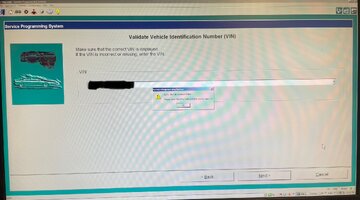
Well I managed to unlock using the crack by following the video earlier in this thread! thank you... now i have this problem, any ideas folks?
 

Attachments

  • IMG_2446.jpg
    IMG_2446.jpg
    253.8 KB · Views: 4
This is the GM OEM Dealership Manual for using the TIS2000 Software, including Installation, Set Up, etc. IIANM... there are TWO Ways to enter VINs when using SPS... and I believe it lies hidden somewhere in this Document.

Please renew your attempt after double checking the VIN Syntax and take the time to visit the Vehicle and take the number DIRECTLY from the VIN Plate or off of the Aluminium Plate inside the Glove Box or on the Driver's Door Jamb. It seems so obvious.. but the issue is an easy mistake to make or overlook the taking of this Data with care:

Visit THIS Link and use whatever "Save Document as" procedures are necessary to save this On-Line File as an 86 Page PDF. For Linux Users, Pressing the Key Combo of "CTRL" and the Letter "P" Keys allows for the instant conversion and save option to a PDF.

 
Last edited:
This is the GM OEM Dealership Manual for using the TIS2000 Software, including Installation, Set Up, etc. IIANM... there are TWO Ways to enter VINs when using SPS... and I believe it lies hidden somewhere in this Document.

Please renew your attempt after double checking the VIN Syntax and take the time to visit the Vehicle and take the number DIRECTLY from the VIN Plate or off of the Aluminium Plate inside the Glove Box or on the Driver's Door Jamb. It seems so obvious.. but the issue is an easy mistake to make or overlook the taking of this Data with care:

Visit THIS Link and use whatever "Save Document as" procedures are necessary to save this On-Line File as an 86 Page PDF. For Linux Users, Pressing the Key Combo of "CTRL" and the Letter "P" Keys allows for the instant conversion and save option to a PDF.

thanks for the info and advice, I tried the SPS in Tech2 transfer mode, would not recognise VIN ((TIS2000 would not recognise the VIN number, (checked many times!), when I tried to populate the vehicle details into vehicle Context form. RA rodeo came up but only back to 2006 mine is 2004. I can only assume the TIS2000 software is too new for my old car or for a different region.

I tried pass through and the 3rd method, passthrough RS235 or something i forget now, but both those methods feedback is vehicle type not supported. the GM SPS install guide seemed lacking in the specifics i need.
 
thanks, I
thanks for the info and advice, I tried the SPS in Tech2 transfer mode, would not recognise VIN ((TIS2000 would not recognise the VIN number, (checked many times!), when I tried to populate the vehicle details into vehicle Context form. RA rodeo came up but only back to 2006 mine is 2004. I can only assume the TIS2000 software is too new for my old car or for a different region.

I tried pass through and the 3rd method, passthrough RS235 or something i forget now, but both those methods feedback is vehicle type not supported. the GM SPS install guide seemed lacking in the specifics i need.
have discovered my clone install disc only has the software for OPEL or GMNAO i need the TIS2000 software for GM australia or Isuzu TIS2000 software. as the opel version doesnt have the vehicle option i need. also the GMNAO is no good either. i suspect the crack key will also not work. feeling a bit dejected as Ive spent over 100 hours working on this...
 
  • Sad
Reactions: Mooseman
Bugger! Unfortunately we have absolutely no experience with using Tis2000 with Oz vehicles or where to find a compatible version.

And you'd also be hooped trying to use the Tech 2 with GM's online ACDelco TDS SPS as the Tech 2 is no longer supported as a passthrough.

You could get a compatible J2534 adapter. My own personal experience with the TopDon RLink X3 adapter is that it works with SPS and would likely work with your GM vehicle but I would try and confirm this with TopDon first. It's not a cheap tool. Check with ACDelco to confirm that TDS even supports your vehicle before buying a 2 year subscription for your VIN.

ACDelco TDS

 
  • Wow
Reactions: mrrsm

Forum Statistics

Threads
24,213
Posts
647,985
Members
20,604
Latest member
Jenise123

Members Online