

By Jove, I think you've got it! That will be great to try out and be able to confirm one way or the other if the valves are cooperating with the PCM. Based on what I know at this point I see that as quite an accomplishment to get bi-directional control from a simple bluetooth dongle and app! What's even greater is having this kind of information on a public forum for the benefit of others as well.
Public,,,, to a point.
I have reservations about divulging the specific instructions in public so I will be private messaging you the actual message to send.
These instructions are highly specific to THIS PCM and perhaps even THIS platform. Sending such an instruction on a different PCM could have disastrous results. I wish not to be a part of that possibility.
How to send said messages is more of a feature of Car Scanner and Torque Pro as well so that much can be described here without concern.
When constructing a "sensor" as Car Scanner calls them one of the selections is for what type of entry are we building. Car Scanner labels this a "Decode Scheme". By far the most common is "Formula".
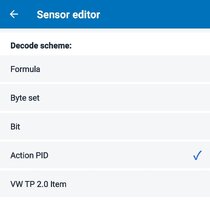
Among the choices is "Action PID". An action PID is placed in a "Dashboard" and when tapped it sends the message specified as the "Command" along with the header entered directly below the Command. Additional strings can be included by entering them in the entries below as "Start Diagnostics ..." and "Stop Diagnostics....".
In the images I posted, "Purge_100%", "close_vent" and "EVAP_Leak_Test" are all Action PIDS I created in the "Sensor" editor. Since I am not sending a "Test Tool Present" message periodically these actions will expire in about 5 seconds as seen on the graphs. This is a safe way of doing this for now.
The other displays are simple "Formula" Sensors like the one you just set up for Fuel Tank Pressure.
Torque Pro can do similar with the use of "Buttons" on a Dashboard if memory serves. I had a Torque Pro Dashboard with a button that would command the engine cooling fan to 100% for a short time.
Now then, an important note. If I tap the "close_vent" Action PID display the instruction message is sent and the "EVAP_Vent" display will toggle from "0" to "1". All this means is the PCM has activated the driver for that circuit. It will do this even if the PCM is sitting on a bench with no wiring for said vent solenoid present.
You would need to listen for the vent activating preferably back nearby the vent location. I can hear it in the drivers seat but only for one of the two actions, closing or opening. I forget which makes more noise.
With a running engine and the purge valve closed I saw no difference in Fuel Tank Pressure when I closed the Vent. (seen in 1st image)
On another test after the truck had idled for some time I noted the PCM had opened the purge valve at a little more than 10% duty. That time when I closed the vent valve I could see a small increase in Fuel Tank Pressure voltage (vacuum). I also noted the PCM adjusted the purge valve duty cycle lower, likely due to increased fuel vapors altering the fuel mixture.
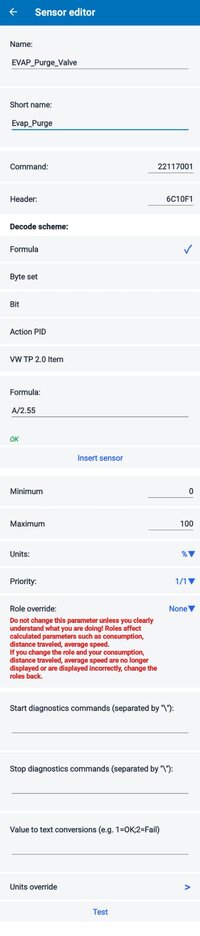
Have you setup a purge valve sensor yet?
Last edited: