
NEED HELP 2005 tahoe: get onstar steering wheel button use back

Sensurround

Member
Joined
Jun 27, 2026
Posts
4
Location
DFW, TX
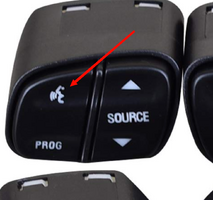
So I have a 2005 Tahoe with an aftermarket radio installed. All the steering wheel buttons are available to be mapped EXCEPT the one for onstar (the upper level, upper left button that has the person speaking on it) I pulled the fuse for the onstar module to disable it since its useless now.

I'd LOVE to be able to map it to be able to use Gemini on Android Auto, but right now it's completely useless, and not mappable at all. Is there any way to get this button mappable?
SCR-20260627-ljbf.png
 
Google seems to offer a potential solution in response to the question: Can the steering wheel Onstar button be remapped on a 2005 Tahoe?

Yes, you can remap the OnStar button on a 2005 Chevy Tahoe, but it requires installing an aftermarket head unit and a steering wheel control (SWC) adapter (such as a PAC Audio or iDatalink module). The factory system does not allow remapping. [1, 2, 3]

The Remapping Process
  • Factory Setup: The OnStar "Call/Voice" button operates on a dedicated data network directly tied to the GM OnStar module and cannot be reprogrammed.
  • Aftermarket Route: By installing a compatible aftermarket stereo and an adapter like the PAC RadioPRO RP5-GM11 or an Axxess ASWC-1, the module intercepts the vehicle's data bus. [1, 2]
  • Customization: Most adapters let you manually program what the OnStar button triggers (e.g., activating Siri, Google Assistant, or answering Bluetooth phone calls). [1, 2]

Hardware Requirements
To make the remapping function properly, you need the following:
  • Aftermarket Stereo: Must be compatible with steering wheel controls (SWC).
  • Wiring Interface: Use an integration module like the PAC RP5-GM11 or Crux SOOGM-16 to interface with the factory wiring.
  • Reprogramming (Flashing): The SWC adapter will need to be flashed or manually programmed to map the OnStar button’s resistance to the new stereo's "Voice/Mute" function. [1, 2, 3, 4, 5]

Physical Limitations
The factory button physically cannot be separated or replaced with a standard audio button; you will be using the existing OnStar button assembly on the wheel to send the newly assigned command
 
  • Like
Reactions: Sensurround
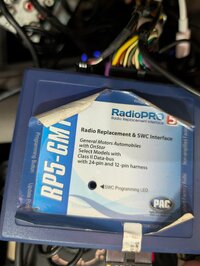
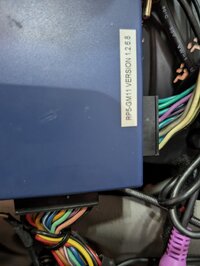
That's the thing, I have one of those aftermarket gizmos. I THINK it's a PAC RadioPRO RP5-GM11 but u'd have to pull the radio out for sure. From what i've read, the thing specifically ignores that button.

Programming the RP5 to see buttons for some reason just ignores that button.
 
Okay I pulled the radio and the dash out and I'm looking at the rp5 gm11. The programming button flashes whenever you press any of the steering wheel control button except for the voice button. It's completely ignoring that button for some reason

That's what I'm trying to fix
 
The programming button flashes whenever you press any of the steering wheel control button except for the voice button. It's completely ignoring that button for some reason
Two thoughts come to mind:
1) Google's response is not correct (what, AI makes a mistake? I know . . .)
2) The button itself is not functioning properly such that no signal is registering at the interface.
 
From what little i've read, the old version I have might specifically ignore that button ("Onstar retention" is a feature of this thing) so maybe it's "Broken as designed"

To even update the firmware of this thing, apparently I need to buy a device that converts USB to a 5 pin interface. This thing is ANCIENT. Back when I did car stereos, they were all USB updatable. Maybe I just need a new one, but i'd love to not do that.

The button works, if I enable onstar, it kicks onstar on and endlessly tries to connect. so i'm kind of flummoxed here.


PXL_20260627_211314626.jpgPXL_20260627_211324344.MP.jpg
 
Since the label on the unit specifies GM Automobiles with OnStar my bet would be that OnStar functionality is retained by design; reprogramming the OnStar button is not possible.

Also, I checked the steering wheel button schematics and it looks like all the steering wheel button signals, including OnStar, go directly to the BCM. Since the unit sits between the BCM and the radio it
interprets signals from the BCM rather than managing them before they get to the BCM. I do not see how you can remap the OnStar button with this configuration.
 
More than likely, the BCM only sends the signal from that button to the OnStar only via CANBUS. It does the same to the radio.

Now there may be another way by cutting out the BCM and the need for the adapter completely by using the resistance values from the switches directly into the radio if it has appropriate input lines Key1, Key2 and KeyGND.


Since I wrote that thread, I had replaced that head unit with a newer one that does have the Key inputs but I haven't been able make it recognize the different resistances. It just recognizes all of them for one function, in my case, volume up.
 

Forum Statistics

Threads
24,314
Posts
649,196
Members
20,848
Latest member
JohnL99

Members Online

No members online now.