
2003 Tahoe, lots of electrical gremlins

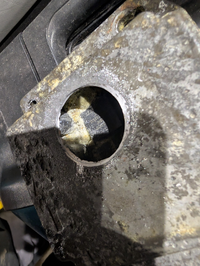
I got a bit bad feeling about apparently epoxy filled SDM module and cut a hole in it...
1763929966631.png
Definitely not epoxy filled. Give the electro cleaner a go tomorrow before applying power...

If I need a new SDM, is it ok to get one from a scrapyard/Ebay and just put it in or do it need to be programmed?
 
  • Like
Reactions: mrrsm
Checking the manual, it doesn't say anything about that, however they talk about Mig welding in new bolts if they are stripped or broken. And it's an actual sensor, not just a module as it has to be mounted in the proper direction. There is this one caution:

If the vehicle interior is exposed to moisture and becomes soaked up to the level of the sensing and diagnostic module (SDM), the SDM and SDM harness connector must be replaced. The SDM could be activated when powered, which could cause airbag deployment and result in personal injury.

I did ask Gemini and got this answer:

Yes, a new or used replacement
Supplemental Restraint Module (SDM) on a 2003 Chevy Tahoe needs to be programmed using a specialized scan tool (like a
GM Tech 2
or equivalent).


Failure to program the module will result in the airbag warning light staying on and the system not functioning correctly in the event of an accident. You will likely encounter a configuration error code, such as B1001.
 
  • Like
Reactions: mrrsm and SveinHa
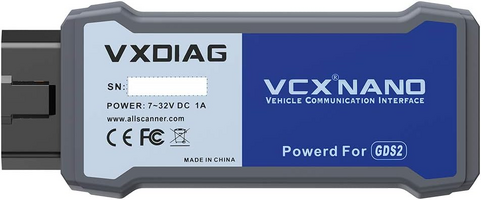
Will you need a Tech 2 or a VXDIAG NANO Scan Tool to re-program - re-calibrate any of the modules over time? Thankfully the Early Model Tahoe is well within the Wheel House of the TIS2000 Software needed that will work up until 2013.


1764009961382.png

If you can locate one of these on eBay... It will work with TIS2000 SPS Software:


1764009773680.png
 
Last edited:
  • Like
Reactions: SveinHa
Things progress slowly... Got a second hand SDM with another P/N. My original is P/N 15192444 and the "new" is P/N 21992622. They look equal and the key notches in the connector is identical. I also got a new connector with 15 cm of wires and a spot check of a handful of wires indicate the same colors so I assume that it can be used.

So far, I'm unable to communicate with the new SDM. I have 12V on pin 1 (+ ign) and 32 (ground). I find a variable voltage on pin 22 which indicate serial data. These corresponds to the wiring diagram. I'm considering hooking the unplugged SDM to a separate 12v source to see if I can get communication with my UCAN diag unit. Good idea or...?

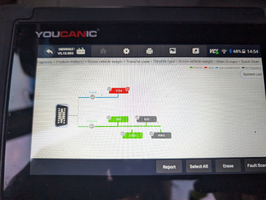
When I hooked up my diag a few weeks ago, I got all these modules:
1765742019925.png

...but now, I only get these:
1765742155693.png

I guess I might have screwed up something when accessing the JP205... but I still seem to have some kind of communication running to the SDM...

I also have a VXDIAG coming my way but so far, it have been using 2.5 weeks NOT leaving Hong Kong :Banghead:
 
  • Like
Reactions: mrrsm
You have probably plundered these Three Videos already on this SDM R&R ...but -=jik=- not as yet:


... One cannot have enough information when performing new R&R and "Touchy" or Exotic Repair Experiences... and Paul "Scanner" Danner and his Brother James (and son, Caleb) have many GM Diagnostic Videos and Classroom Training and Suggestions that are simply "Top Shelf".
 
Last edited:
  • Like
Reactions: SveinHa
Finally, I found time to continue work on my Tahoe.

I've found the reason for the difference in number of systems in the two screenshots from Youcanic in my previous post. If I read VIN from the vehicle, I only find 5 systems but if I manually select vehicle, I get 21 systems... Feels fine to have found out why that happend but not very important right now...

I've spent literally the whole day trying to get Tech2Win running with my VXDIAG unit but no luck... After spending several hours on videos and reading, trying to follow VXDIAG instructions, purchasing Tech2Win subscription, I end up getting communication with the VXDIAG unit ONLY from VX Manager.

In VX Manager, I've installed PASSTHRU and GM GDS2/T2W, the relevant licences, updated firmware and licences.

When starting the Tech2Win supplied from VXDIAG, I get an error E667560 Could not start Tech2Win. Initially, I believed that this version were functional but it seems that it only is a kind of demo that is unable to connect.

When logging on to ACDelco and trying to start Tech2Win it just won't start and when trying to download from ACDelco, the download seems to start but after a few seconds it stops saying that there are no communication with the interface.

Several times, I have got a "UEH101:null" or "UEH101: Duplicate key deliverable_GM Global" and uninstalled /reinstalled all... with no luck... So far, I feel confident that either VXDIAG or Tech2Win or both are a real piece of crap...
 
The VXDiag has been known to be a problematic piece of crap. If you can, return it.

With your 2003, you probably would have been better off just finding a Tech 2 and use Tis2000 to program your modules.

I have a TopDon RLink X3 that works great with ACDelco's TDS and GDS systems, however, their description says it only supports 2006+ GM vehicles. Maybe contact TopDon and ask if it would work with your 2003.

Edit: More than likely it wouldn't work. 2006 is when they switched from the old GM LAN to CANBUS. Maybe that's the problem with the VXDiag?
 
Last edited:
  • Like
Reactions: mrrsm
Finally, I got a new second-hand SDM module with the correct P/N from USA. Plugged it in and it seems to work out-of-the-box but now I got a B0026 DTC. By doing a bit of research online I am pointed in the direction of the clockspring in the steering wheel. Will do a bit more research in the car mid next week before ordering new clockspring...
 
  • Like
Reactions: mrrsm and Mooseman

Forum Statistics

Threads
24,202
Posts
647,891
Members
20,590
Latest member
Ecidemon

Members Online