
SuburbanGhost
Member
Hey everyone, hoping I can get some answers here. I've been chasing some persistent issues since January.
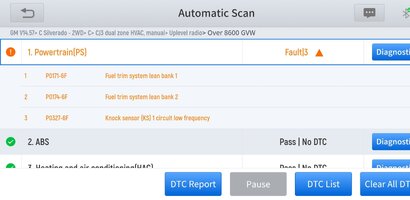
Attached below is a screenshot of a relevant report (recent)
Here's a recap of everything I've figured out so far. If any clarification is wanted for anything please ask, I'm sure I'm missing something.
Primary Symptoms:
Speedometer and odometer completely non-functional
Trip meter does not increment, but engine hour meter works
No CEL at key-on, and Check Engine light fails IPC lamp test
Intermittent total gauge dropout (tach, oil, temp, etc.); voltage gauge stays active
Cruise control sometimes works, even with dead speedo
Vehicle speed shows correctly on scan tool, but not on dash
Cluster doesn’t update odometer
Repairs So Far:
IPC: Swapped with known-good unit – no change
PCM: Replaced with remanufactured unit with proper VIN programming – no change
Vehicle Speed Sensor: Fully functional – live VSS data reads correctly on multiple tools
PDM: Replaced to eliminate false TPMS codes from SUV module – now correct
Key Wiring + Pinouts Verified:
IPC A6 = Class 2 Serial Data (Gray / Circuit 1036)
IPC A12 & B12 = Ground (Black and Black/White – Circuits 1050, 1851)
PCM C1 Pin 58 = Class 2 Serial Data (Dark Green / Circuit 1049)
Jumper from PCM C1-58 to IPC A6 installed — no change. Confirms wire continuity is not the primary issue.
Critical Observations:
1. PCM randomly drops off Class 2 network
Confirmed via Tech2Win: All modules stay active except PCM, which disappears for 25–30 sec
DIC also goes inactive, even after PCM comes back online
Gauge sweep and lamp test pass — except CEL lamp (likely blown bulb or failed trace)
2. Live Class 2 network behavior was monitored using Tech2Win
PCM repeatedly goes inactive during testing while other modules remain
Speedo and odo stop responding only when PCM is inactive
Cruise occasionally works, suggesting partial Class 2 continuity when PCM is online
3. Connector movement triggers dropouts
While gently flexing PCM harness: PCM dropped offline 58 times in 25 minutes (confirmed in Tech2Win)
At one point, truck had no-start, and pressing on PCM connector restored operation
Strong indication of a pin tension issue, corrosion, or broken conductor near C1-58. Inspection and cleaning yielded no results.
Class 2 Codes Seen (Intermittent):
U1000, U1016, U1301 – Appear and disappear, but symptoms persist regardless
Tech2Win confirms Class 2 loss even when no U-codes are present
Diagnostics Done So Far...
IPC and PCM both replaced
Direct wire jumper from PCM C1-58 to IPC A6 – no change
Verified IPC grounds and power
Confirmed correct PDM and BCM part numbers
Verified VSS live data
Ran full IPC test through Tech2Win – gauges and lamps pass (except MIL)
Physical inspection of PCM connectors – no corrosion visible but not yet de-pinned. Having trouble removing the blue cover without feeling like I'm going to break it.
End Summary:
I'm tired of baking in the desert heat without AC intermittently. Sad part is other than that, the truck is solid....
It was an Auction truck, previous owner did some horrible hack jobs. Especially electrical hack jobs.
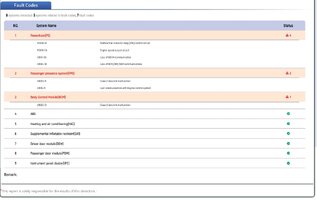
Attached below is a screenshot of a relevant report (recent)
Here's a recap of everything I've figured out so far. If any clarification is wanted for anything please ask, I'm sure I'm missing something.
Primary Symptoms:
Speedometer and odometer completely non-functional
Trip meter does not increment, but engine hour meter works
No CEL at key-on, and Check Engine light fails IPC lamp test
Intermittent total gauge dropout (tach, oil, temp, etc.); voltage gauge stays active
Cruise control sometimes works, even with dead speedo
Vehicle speed shows correctly on scan tool, but not on dash
Cluster doesn’t update odometer
Repairs So Far:
IPC: Swapped with known-good unit – no change
PCM: Replaced with remanufactured unit with proper VIN programming – no change
Vehicle Speed Sensor: Fully functional – live VSS data reads correctly on multiple tools
PDM: Replaced to eliminate false TPMS codes from SUV module – now correct
Key Wiring + Pinouts Verified:
IPC A6 = Class 2 Serial Data (Gray / Circuit 1036)
IPC A12 & B12 = Ground (Black and Black/White – Circuits 1050, 1851)
PCM C1 Pin 58 = Class 2 Serial Data (Dark Green / Circuit 1049)
Jumper from PCM C1-58 to IPC A6 installed — no change. Confirms wire continuity is not the primary issue.
Critical Observations:
1. PCM randomly drops off Class 2 network
Confirmed via Tech2Win: All modules stay active except PCM, which disappears for 25–30 sec
DIC also goes inactive, even after PCM comes back online
Gauge sweep and lamp test pass — except CEL lamp (likely blown bulb or failed trace)
2. Live Class 2 network behavior was monitored using Tech2Win
PCM repeatedly goes inactive during testing while other modules remain
Speedo and odo stop responding only when PCM is inactive
Cruise occasionally works, suggesting partial Class 2 continuity when PCM is online
3. Connector movement triggers dropouts
While gently flexing PCM harness: PCM dropped offline 58 times in 25 minutes (confirmed in Tech2Win)
At one point, truck had no-start, and pressing on PCM connector restored operation
Strong indication of a pin tension issue, corrosion, or broken conductor near C1-58. Inspection and cleaning yielded no results.
Class 2 Codes Seen (Intermittent):
U1000, U1016, U1301 – Appear and disappear, but symptoms persist regardless
Tech2Win confirms Class 2 loss even when no U-codes are present
Diagnostics Done So Far...
IPC and PCM both replaced
Direct wire jumper from PCM C1-58 to IPC A6 – no change
Verified IPC grounds and power
Confirmed correct PDM and BCM part numbers
Verified VSS live data
Ran full IPC test through Tech2Win – gauges and lamps pass (except MIL)
Physical inspection of PCM connectors – no corrosion visible but not yet de-pinned. Having trouble removing the blue cover without feeling like I'm going to break it.
End Summary:
I'm tired of baking in the desert heat without AC intermittently. Sad part is other than that, the truck is solid....
It was an Auction truck, previous owner did some horrible hack jobs. Especially electrical hack jobs.
Attachments
Last edited: