No Connection between Tech 2 and Candi Module

LBZDuraburb

Member
Joined
Dec 9, 2025
Posts
27
Location
Tacoma, WA
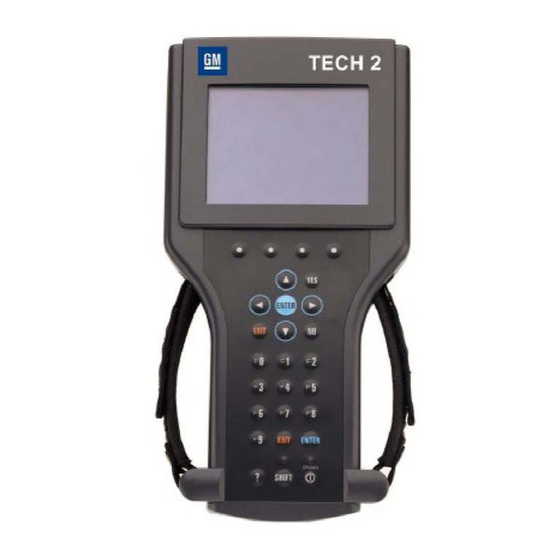
I have two brand new Chinese clone Tech 2s. eBay seller sent me a brand new Tech2 with all accessories after first one did not recognize the Candi module. Green light just continuously flashes with both Tech 2s and Candi Modules. Each Tech2 has separate Candi Modules and neither one of them recognizes the Candi module. I have tried plugging it in to three different vehicles and it's the same issue. All other Tech 2 functions seem to work properly. Is it possible that I got two bad Candi Modules? I have a hard time believing it but it is cheap Chinese so who knows.... Any ideas on how to get one to work? As far as I can tell, all connections are good. I just can't get a solid green light on the Candi module or the message at the start screen saying "Candi module connected" when connected to the OBDII ports.
 
You are in Luck... It is remarkable that this information is still available to us, but as the OEM Tech 2 Provider, Bosch has produced this PDF to explain all of the operational aspects of the relationships between the Tech 2 and the CANdi Devices:

BOSCHOEMTECH2CANDIDATA.jpg

Additionally... Prior to hooking up the Tech 2 to the DLC... Try performing these "Assured Connection Steps" in the following order:

(1) ALWAYS Plug the Power Connection through the Power Port on the DLC Cable and NOT via the Power Port on the Tech 2 Base Unit.

(2) Slide the VCI Lock Lever to one side in the base of the Tech 2 and after removing it, use some CRC Electric Spray Solvent to flush out any Post-Manufacturing Detritus that may interfere with it getting a good, unbreakable connection between its internal tines and the Logic Board in the Base of the Tech 2. Allow the solvent to air dry and then re-insert the VCI Unit FIRMLY BUT GENTLY and slide the Lock home.

(3) Likewise, do the same operations with the CANdi Module-Cable with its very fine tubular copper Male-To-Female interface. Take special care to observe the difficulty with getting the S/S Locking Tab to completely LOCK when pushing the two sides into each other.

(4) Perform a Good Diagnostic of your DLC Port inside the Vehicle and have a look at THESE Training Videos on how to assure that it is functioning properly:


(5) Be very fastidious with your "GYMKO" Tech 2 whenever it comes to the Basic Setting Up of your Gear ...and create an "Orders Procedures" Method that will almost guarantee that the steps you take will solve most connection problems.

(6) Visit and Review ALL of the Tech 2 Training Videos provided by "DrShock" via THIS YouTube Link to his Channel:


CRC QD Electronic Connections Cleaner is THE BEST Solvent for doing these "Clean Ups":


61OrSbvCKCL._AC_SL1500_.jpg

Remember that "Big Problems ...have Small Beginnings" and very often can be run to ground by following these methods.... BOL (Best Of Luck)

PS... I am including THE TECH 2 Paths BIBLE PDF that covers The Step By Step Key Pad Buttons to press for ALL Diagnostic Aspects of your Tech 2. They are in Alphabetical Order and address using the Function, Entry and Exit (Yes and No) and Numeric Orders of Operation to follow that will assure your Successful Diagnostics:

TECH2KEYPAD.jpeg
 

Attachments

Last edited:
  • Like
Reactions: LBZDuraburb
FWIW, on my own Tech 2 knockoff I found the connectors of the cable to the adapters flat out suck. I had issues with just maintaining a connection to my non-CANDI Class 2 serial data vehicles. After investigating I ended up removing the internal spring in the connector body.
 
You are in Luck... It is remarkable that this information is still available to us, but Bosch as the OEM Tech 2 Provider produced this PDF to explain all of the operational aspects of the relationships between the Tech 2 and the CANdi Devices:

View attachment 118571

Additionally... Prior to hooking up the Tech 2 to the DLC... Try performing these "Assured Connection Steps" in the following order:

(1) ALWAYS Plug the Power Connection through the Power Port on the DLC Cable and NOT via the Power Port on the Tech 2 Base Unit.

(2) Slide the VCI Lock Lever to one side in the base of the Tech 2 and after removing it, use some CRC Electric Spray Solvent to flush out any Post-Manufacturing Detritus that may interfere with it getting a good, unbreakable connection between its internal tines and the Logic Board in the Base of the Tech 2. Allow the solvent to air dry and then re-insert the VCI Unit FIRMLY BUT GENTLY and slide the Lock home.

(3) Likewise, do the same operations with the CANdi Module-Cable with its very fine tubular copper Male-To-Female interface. Take special care to observe the difficulty with getting the S/S Locking Tab to completely LOCK when pushing the two sides into each other.

(4) Perform a Good Diagnostic of your DLC Port inside the Vehicle and have a look at THESE Training Videos on how to assure that it is functioning properly:


(5) Be very fastidious with your "GYMKO" Tech 2 whenever it comes to the Basic Setting Up of your Gear ...and create an "Orders Procedures" Method that will almost guarantee that the steps you take will solve most connection problems.

(6) Visit and Review ALL of the Tech 2 Training Videos provided by "DrShock" via THIS YouTube Link to his Channel:


CRC QD Electronic Connections Cleaner is THE BEST Solvent for doing these "Clean Ups":


View attachment 118569

Remember that "Big Problems ...have Small Beginnings" and very often can be run to ground by following these methods.... BOL (Best Of Luck)

PS... I am including THE TECH 2 Paths BIBLE PDF that covers The Step By Step Key Pad Buttons to press for ALL Diagnostic Aspects of your Tech 2. They are in Alphabetical Order and address using the Function, Entry and Exit (Yes and No) and Numeric Orders of Operation to follow that will assure your Successful Diagnostics:

View attachment 118572

Great stuff! Thank you.👍 I will try all of your recommendations.
 
  • Like
Reactions: mrrsm
NP... Glad to Help... And here is one more image from the Official Bosch Tech 2 Owner's Manual that gives a better look at "WHERE?" to plug in the 12 Volts DC Power to the DLC Cable at the (9) Spot versus NOT using the (1) Spot for Power as a Better Explanation of "WHY?" :

TECH2POWERMETHODS.jpg

Bosch OEM Tech 2 Manual (In Color...TOO LARGE TO POST HERE) :


Tech 2 Training Media Guide:


Attachments

Last edited:
  • Like
Reactions: LBZDuraburb
You are in Luck... It is remarkable that this information is still available to us, but as the OEM Tech 2 Provider, Bosch has produced this PDF to explain all of the operational aspects of the relationships between the Tech 2 and the CANdi Devices:

View attachment 118571

Additionally... Prior to hooking up the Tech 2 to the DLC... Try performing these "Assured Connection Steps" in the following order:

(1) ALWAYS Plug the Power Connection through the Power Port on the DLC Cable and NOT via the Power Port on the Tech 2 Base Unit.

(2) Slide the VCI Lock Lever to one side in the base of the Tech 2 and after removing it, use some CRC Electric Spray Solvent to flush out any Post-Manufacturing Detritus that may interfere with it getting a good, unbreakable connection between its internal tines and the Logic Board in the Base of the Tech 2. Allow the solvent to air dry and then re-insert the VCI Unit FIRMLY BUT GENTLY and slide the Lock home.

(3) Likewise, do the same operations with the CANdi Module-Cable with its very fine tubular copper Male-To-Female interface. Take special care to observe the difficulty with getting the S/S Locking Tab to completely LOCK when pushing the two sides into each other.

(4) Perform a Good Diagnostic of your DLC Port inside the Vehicle and have a look at THESE Training Videos on how to assure that it is functioning properly:


(5) Be very fastidious with your "GYMKO" Tech 2 whenever it comes to the Basic Setting Up of your Gear ...and create an "Orders Procedures" Method that will almost guarantee that the steps you take will solve most connection problems.

(6) Visit and Review ALL of the Tech 2 Training Videos provided by "DrShock" via THIS YouTube Link to his Channel:


CRC QD Electronic Connections Cleaner is THE BEST Solvent for doing these "Clean Ups":


View attachment 118569

Remember that "Big Problems ...have Small Beginnings" and very often can be run to ground by following these methods.... BOL (Best Of Luck)

PS... I am including THE TECH 2 Paths BIBLE PDF that covers The Step By Step Key Pad Buttons to press for ALL Diagnostic Aspects of your Tech 2. They are in Alphabetical Order and address using the Function, Entry and Exit (Yes and No) and Numeric Orders of Operation to follow that will assure your Successful Diagnostics:

View attachment 118572

I made an error in my original post. I thought a solid green light meant that the Candi Module was connected properly. I have always had a flashing green light on the Candi Module, which should mean that it is connected properly but the message on the Tech 2 screen says Candi module not detected/connected. Is it fairly common for this to happen where it is not recognized but you have the flashing green light?
 
Last edited:
  • Like
Reactions: mrrsm
Not very common... but it "CAN" Happen (Pun Intended)...

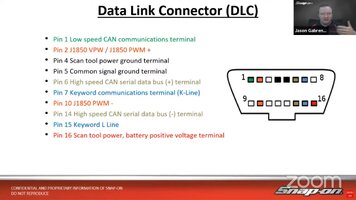
The Best Way to test for CAN Bus Activity is to first install a working "BOB" (Break Out Box) into the DLC and THEN plug in the Tech 2 DLC Cable into the Second DLC Connector on the "BOB". Because ALL 16 DLC individual Pin-Outs are encircled by their own "Collision Lights"...they will light up at the first sign of ANY Electrical Activity or Pulsations.

For example, whenever there is ANY PWM (Pulse Width Modulation) Activity either on the #2 Pin-Out for Class 2 Network Activity... the Light will Flicker and Fluctuate. Likewise, or ...on CANdi Systems, Pin-Outs #6 and #14 will Pulsate to indicate Activity on the High and Low CAN Bus Lines.

Also, because these 16 Pin-Outs are of the Standard 4 mm Banana Jack Design on the "BOB" Interface, You can Plug in a DMM at the Pins #4 and #5 for Testing the individual PCM and BODY GROUNDS and Plug the Other Leads into either the #6 or the #14 Positions to observe Voltage Fluctuations:

DLCPLUGPINOUTS.jpg

Again, because ALL CAN Bus Designs employ TWO 120 Ohm Terminating Resistors in order to minimize Reflective Communication Oscillations and keep the CAN Bus "Quiet" using Twisted Paired Wiring to diminish or cancel ambient environmental noise (Fluorescent Lamp Balasts) and Radio RF Energy from scrambling the High and Low Signaling, ... You can use your DMM to Plug One Lead into the #6 Port and the Other Lead into the #14 Port and you should read (SEE) close to 60 Ohms of Resistance if the CAN Bus is Functioning Properly.

Remember... The Actions of the CAN-Bus should be -=Completely Transparent=- whenever the Tech 2 DLC Cable in combination with the Tech 2 Can-Bus Device are installed in series ahead of the Tech 2 Scan Tool itself. Here is an interesting Video of a Tech 2 CAN Bus Unit being Repaired for this particular Connections Issue and one of How the "BOB" Device Advantageously Works. The Last Video shows a Side By Side Comparison between the GM OEM Bosch Vetronix Tech 2 and the "GYMKO" (General Motors Knock Off) Tech 2 Copy and their respective CANdi Units and Cable Ends:


Last edited:
  • Like
Reactions: LBZDuraburb
Not very common... but it "CAN" Happen (Pun Intended)...

The Best Way to test for CAN Bus Activity is to first install a working "BOB" (Break Out Box) into the DLC and THEN plug in the Tech 2 DLC Cable into the Second DLC Connector on the "BOB". Because ALL 16 DLC individual Pin-Outs are encircled by their own "Collision Lights"...they will light up at the first sign of ANY Electrical Activity or Pulsations.

For example, whenever there is ANY Activity either on the #2 Pin-Out for Class 2 Network Activity... the Light will Fluctuate. Likewise, on CANdi Systems, Pin-Outs #6 and #14 will Pulsate to indicate Activity on the High and Low CAN Bus Lines.

Also, because these Pin-Outs are of the Standard 4 mm Banana Jack Design, You can Plug in a DMM at the Pins #4 and #5 for GROUND and Plug the Other Leads into either the #6 or the #14 Positions to observe Voltage Fluctuations.

Again, because ALL CAN Bus Designs employ TWO 120 Ohm Terminating Resistors in order to minimize Reflective Communication Oscillations and keep the CAN Bus "Quiet" using Twisted Wiring to diminish or cancel ambient environmental and Radio RF Energy from scrambling the high and Low Signaling, ... You can use your DMM to Plug One Lead into the #6 Port and the Other Lead into the #14 Port and you should read (SEE) close to 60 Ohms of Resistance if the CAN Bus is Functioning Properly.

Remember... The Actions of the CAN-Bus should be -=Completely Transparent=- whenever the Tech 2 DLC Cable in combination with the Tech 2 Can-Bus Device are installed in series ahead of the Tech 2 Scan Tool itself. Here is an interesting Video of a Tech 2 being used in combination with a "BOB" Device:


I am positive the DLC ports in my 3 vehicles are not the issue because my Snap On Solus Ultra works perfectly fine with them.
You are in Luck... It is remarkable that this information is still available to us, but as the OEM Tech 2 Provider, Bosch has produced this PDF to explain all of the operational aspects of the relationships between the Tech 2 and the CANdi Devices:

View attachment 118571

Additionally... Prior to hooking up the Tech 2 to the DLC... Try performing these "Assured Connection Steps" in the following order:

(1) ALWAYS Plug the Power Connection through the Power Port on the DLC Cable and NOT via the Power Port on the Tech 2 Base Unit.

(2) Slide the VCI Lock Lever to one side in the base of the Tech 2 and after removing it, use some CRC Electric Spray Solvent to flush out any Post-Manufacturing Detritus that may interfere with it getting a good, unbreakable connection between its internal tines and the Logic Board in the Base of the Tech 2. Allow the solvent to air dry and then re-insert the VCI Unit FIRMLY BUT GENTLY and slide the Lock home.

(3) Likewise, do the same operations with the CANdi Module-Cable with its very fine tubular copper Male-To-Female interface. Take special care to observe the difficulty with getting the S/S Locking Tab to completely LOCK when pushing the two sides into each other.

(4) Perform a Good Diagnostic of your DLC Port inside the Vehicle and have a look at THESE Training Videos on how to assure that it is functioning properly:


(5) Be very fastidious with your "GYMKO" Tech 2 whenever it comes to the Basic Setting Up of your Gear ...and create an "Orders Procedures" Method that will almost guarantee that the steps you take will solve most connection problems.

(6) Visit and Review ALL of the Tech 2 Training Videos provided by "DrShock" via THIS YouTube Link to his Channel:


CRC QD Electronic Connections Cleaner is THE BEST Solvent for doing these "Clean Ups":


View attachment 118569

Remember that "Big Problems ...have Small Beginnings" and very often can be run to ground by following these methods.... BOL (Best Of Luck)

PS... I am including THE TECH 2 Paths BIBLE PDF that covers The Step By Step Key Pad Buttons to press for ALL Diagnostic Aspects of your Tech 2. They are in Alphabetical Order and address using the Function, Entry and Exit (Yes and No) and Numeric Orders of Operation to follow that will assure your Successful Diagnostics:

View attachment 118572
From what I have seen, I can spray that the CRC QD Electronic Cleaner on the PCMIA card male end and the female receptacle that it plugs into, correct? Same goes for VCI as well? As I understand it, this cleaner can be sprayed on de-energized circuit boards, and pretty much anything electronic?
 
  • Like
Reactions: mrrsm
FWIW, on my own Tech 2 knockoff I found the connectors of the cable to the adapters flat out suck. I had issues with just maintaining a connection to my non-CANDI Class 2 serial data vehicles. After investigating I ended up removing the internal spring in the connector body.
How did you end up removing the internal spring in the connector body? Just shove a pick in there and yank it out? Obviously the connector body can't be taken apart.
 
How did you end up removing the internal spring in the connector body? Just shove a pick in there and yank it out? Obviously the connector body can't be taken apart.

On my version the component with the spring inside CAN be taken apart. I cannot say others are the same.

I looked for photographs I took at the time but as of yet I have not located them.

I will keep looking.

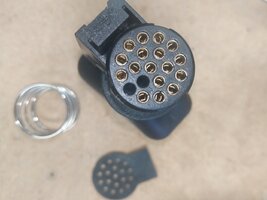
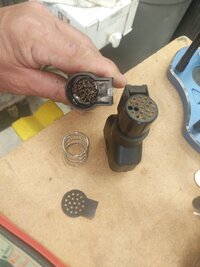
I seem to recall that the plastic disc that all the terminal pins pass through, which gets pushed further into the housing somehow comes out revealing the spring behind it.
 
Last edited:
On my version the componenet with the spring inside CAN be taken apart. I cannot say others are the same.

I looked for photographs I took at the time but as of yet I have not located them.

I will keep looking.

I seem to recall that the plastic disc that all the terminal pins pass through, which gets pushed further into the housing somehow comes out revealing the spring behind it.


Found them!!

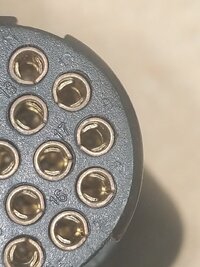
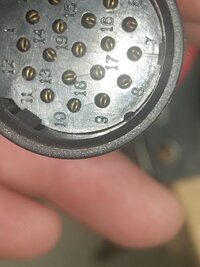
On mine there were little tabs like the one seen between pins 10 & 11.

It was after testing each circuit and seeing things like this I decided to get in there.


I made sure each of these receiving sockets were snug.

IMG_20210608_121117.jpg

Also made sure each of these male terminals were of ample size to fit snug into the receiving sockets.

IMG_20210608_122856.jpg

IMG_20210608_121217.jpgIMG_20210608_141002.jpgIMG_20210608_140925.jpg

I eliminated that coil spring entirely as it was preventing the two pieces to securely remain in place.

I would have to go look but it is even possible that I may have taped the two pieces together as I have no need to change that adapter. No vehicle of mine needs the Candi module I'm all single wire class 2 SAE J1850VPW here.
 
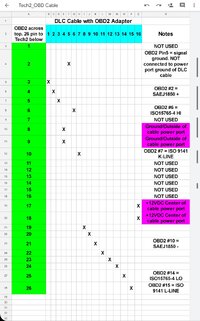
Whew! It would almost be worth it to Cut Off BOTH of those Cylindrical Ends... and get a Brand New Male and Female OBD2 Connectors...and Solder in those (2X ) 16 Connections and then Heat Shrink them onto their respective sides and completely avoid all that complicated GM-Bosch Tech ...just to ensure REAL Good Electrical Conductivity.... Oh Wait a Minute...There are 19 Pins around the Tech 2 - CAN Bus Cable Round Connectors...DAMN !!!
 
Last edited:
  • Like
Reactions: LBZDuraburb

Forum Statistics

Threads
24,198
Posts
647,840
Members
20,586
Latest member
tahoe5150

Members Online

No members online now.